Plugins
I built DraftLift AI because I wanted a small, predictable helper for writing WordPress drafts – not another all-in-one “AI writes your site” product.
The free v1 focuses on a single job: turn a topic into a clean, structured article draft inside your WordPress admin, so you stay in control of the content.
What DraftLift AI does in the free version
DraftLift AI adds a simple “Generate Draft” screen to your WordPress admin.
You enter a topic or working title, choose language, tone, and length, and the plugin creates adraft postwith structured headings, paragraphs, and an optional FAQ section.
There is no auto‑publishing, no front‑end widgets, and no attempt to replace your voice.
The goal is to get you from “I should write something about this” to “I have a decent draft to edit” as fast and as safely as possible.
Provider options: OpenAI or Gemini
The free version lets you choose which AI provider to use for generation.
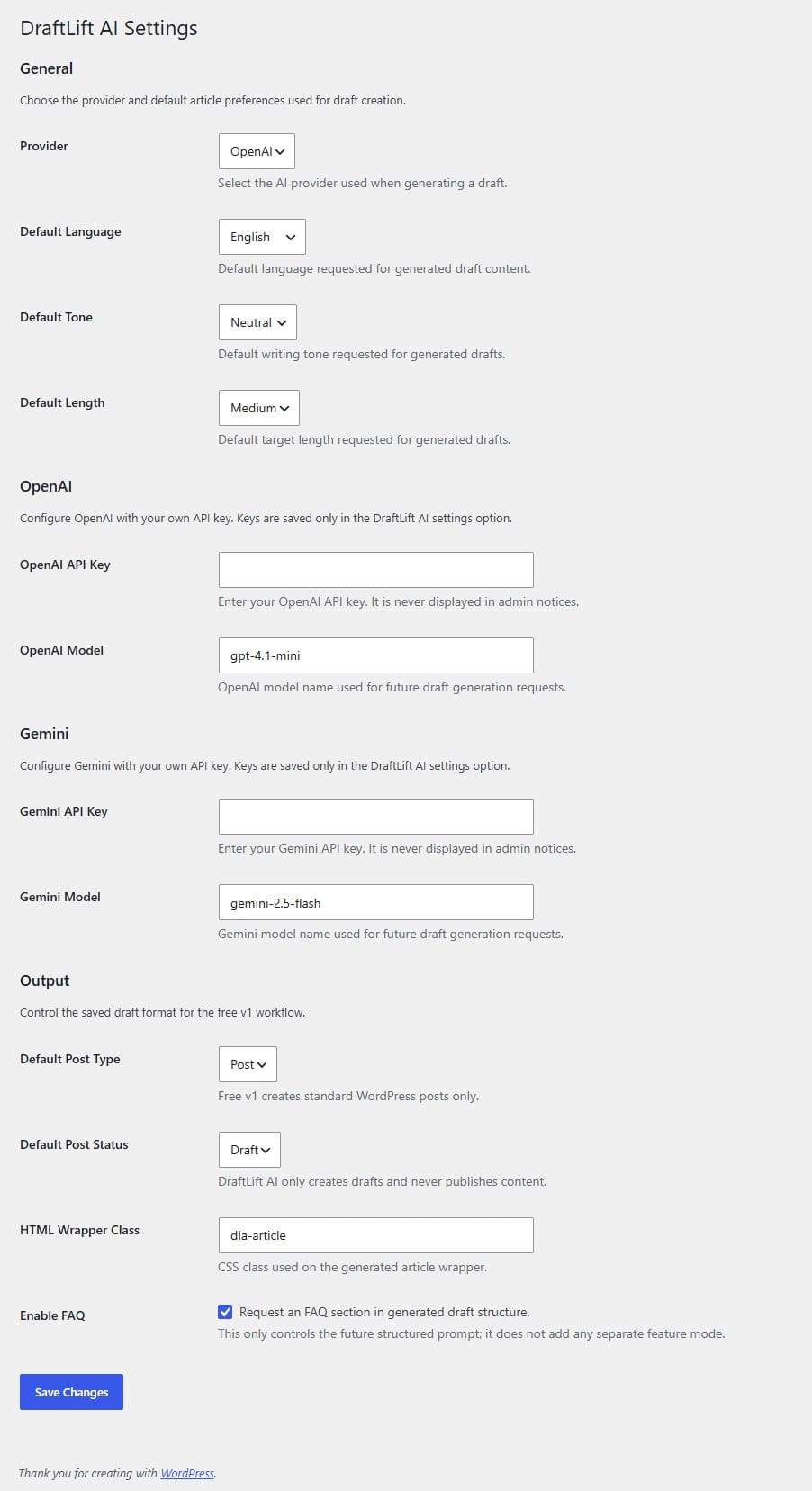
In the settings screen you can:
Pick aProvider: currently OpenAI or Gemini.
Paste your ownAPI keyfor that provider.
Optionally adjust themodel name(for example
gpt-4.1-minifor OpenAI orgemini-2.5-flashfor Gemini, as long as your account has access).
Keys are stored only in the DraftLift AI settings and never shown in admin notices or logs.
You stay in full control of which provider you trust and what model you pay for.
Default draft preferences: language, tone, length
Most people generate similar types of articles again and again, so DraftLift AI lets you set sensible defaults.
InDraftLift AI → Settingsyou can configure:
Default language– for example English, Ukrainian, Spanish, etc.
Default tone– Neutral, Friendly, Professional (you can extend this later in code if needed).
Default length– Short, Medium, Long, depending on how much detail you want in a typical article.
These defaults are used whenever you create a new draft, but you can override them per‑draft directly on the Generate Draft screen.
Output settings: where the draft goes
The free v1 keeps the output side deliberately simple and safe.
You can choose:
Default post type– by default this is
Post, so DraftLift AI only creates standard WordPress posts.Default post status– set to
Draftand stays that way: the pluginnever publishescontent automatically.HTML wrapper class– a CSS class like
dla-articlethat is applied to the generated article wrapper inpost_content.Enable FAQ– if this is enabled, the plugin will ask the AI to include a simple FAQ block at the bottom of the draft.
The idea is that the plugin gives you a predictable HTML structure inside the editor, and your theme handles the styling.
The Generate Draft screen: one topic → one draft
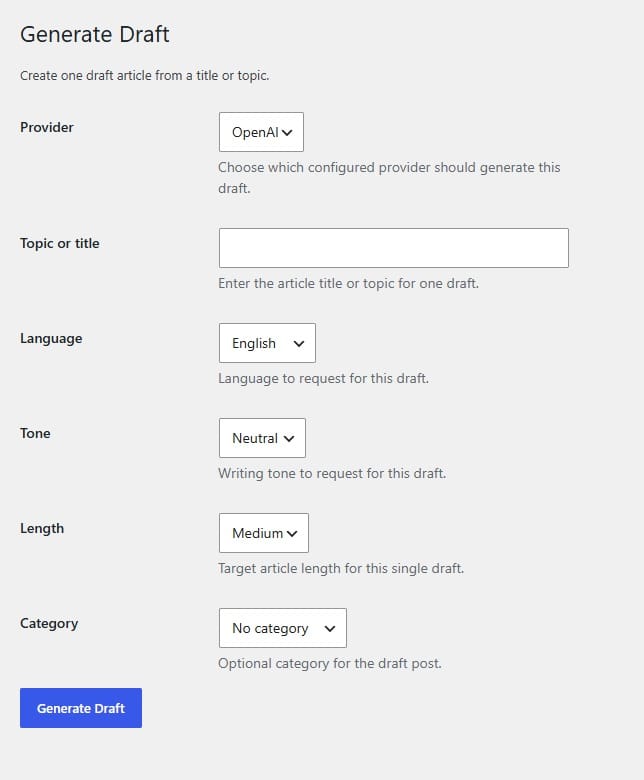
Once you have your settings in place, the day‑to‑day workflow lives underDraftLift AI → Generate Draft.
On this screen you can:
Select theProviderfor this specific draft (overriding the default if you want).
Enter theTopic or title– this can be a working title or just a short description.
Pick theLanguage,Tone, andLengthfor this article.
Optionally choose aCategoryfor the new draft post.
When you clickGenerate Draft, the plugin sends a structured request to the selected provider and creates a new draft post using your chosen settings.You are then free to edit, cut, expand, or completely rewrite the AI output before publishing.
What the plugin does not do (by design)
For the first free version, I intentionallykept the scope narrow:
No front‑end widgets or blocks.
No auto-publishing or scheduled AI posts.
No topic research, keyword tools, or analytics.
No image generation.
No custom database tables.
This keeps the plugin small, transparent, and easy to reason about: it helps you write drafts, and then gets out of the way.
About the upcoming paid version
While the free v1 focuses on a single, stable workflow, I am already working on ideas for a paid version.
The Pro edition will stay compatible with the free core, but will add extra controls around structure, presets, and multi‑step workflows for people who publish a lot.
Right now the paid version is still in development, and I prefer to ship a solid free base before layering more complexity on top.
If you try the plugin and have ideas for what would genuinely help your editorial workflow, I’m open to feedback.
Who this is for
DraftLift AI is not a generic “AI website builder”.
It is meant for people who already write and publish in WordPress, but want a faster way to move from idea to first draft:
solo creators and bloggers,
small business owners who publish occasionally,
agencies and developers who draft content for client sites and want a predictable HTML structure.
If that sounds like you, the best way to understand it is simply to install the free version, plug in your OpenAI or Gemini key, and generate a couple of drafts from topics you already have in mind.



FAQ
Common questions about WordPress project work and ongoing support.
What kinds of WordPress sites do you work with?
I work with business WordPress sites, WooCommerce stores, and projects that need to grow step by step — without unnecessary complexity or fragile solutions. This includes both new launches and existing sites that need refinements, support, or careful technical updates.
Can you improve an existing site without a full redesign?
Yes. Most tasks involve sites that are already live: new sections, functional improvements, WooCommerce changes, performance optimisation, or technical fixes. The goal is for the site to stay stable, manageable, and easy to develop further.
What types of tasks do you take on most often?
Most often this is custom WordPress development, Figma design implementation, WooCommerce refinements, support for live sites, fixing technical issues, and practical improvements over time. In selected scenarios I also help with light AI automations for content, enquiries, or internal admin workflows.
Do you work on WordPress speed and performance?
Yes. WordPress optimisation usually involves reviewing the theme, plugins, images, fonts, page structure, and the site's overall technical neatness. The aim is not a "magic button", but practical changes that make the site faster and easier to maintain.
Do you use AI when working on WordPress sites?
Yes, but only where it genuinely helps the process. AI works best for content drafts, FAQ or support assistants, enquiry handling, and small automations around an existing WordPress site. The approach is simple: AI should reduce routine work, not complicate the site.
What do I need to prepare to discuss a task or project?
Usually a short description of the site, the task, the desired outcome, and examples or technical constraints if you have them is enough. If the project is already live, it also helps to share the current site or a staging environment — this makes it easier to understand the scope of work.
Can I get in touch not for a new site, but for support or specific improvements?
Yes. I work not only on new builds, but also on live sites that need to be maintained, fixed, and improved gradually. This can include new pages, admin changes, WooCommerce refinements, small UX improvements, or technical maintenance.
Need help with a WordPress project?
If you need custom WordPress development, design implementation, or support for an existing site, I would be happy to review the project.